
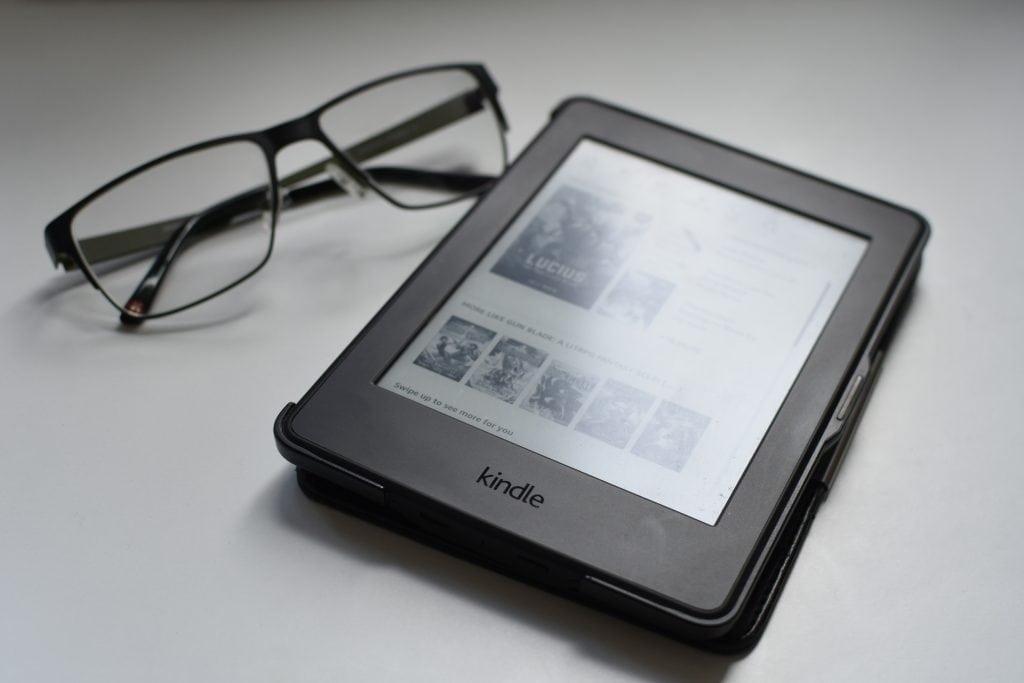
The Kindle Paperwhite has emerged as a leading choice for avid readers and casual book enthusiasts alike, revolutionizing the way we consume literature. Launched by Amazon, the Kindle Paperwhite is part of a broader family of e-readers that have transformed the reading experience by combining the convenience of digital technology with the tactile pleasure of reading. With its sleek design, high-resolution display, and extensive library access, the Kindle Paperwhite caters to a diverse audience, from students to professionals and everyone in between.
The allure of the Kindle Paperwhite lies not only in its functionality but also in its ability to provide a reading experience that closely mimics that of traditional paper books. The device’s E Ink technology ensures that users can read comfortably for extended periods without straining their eyes, making it an ideal companion for long journeys or cozy evenings at home. As we delve deeper into the features and benefits of the Kindle Paperwhite, it becomes evident why this device has garnered a loyal following among readers worldwide.
Key Takeaways
- Kindle Paperwhite is a popular e-reader known for its high-resolution display and long battery life.
- Features of Kindle Paperwhite include a glare-free screen, adjustable front light, and access to millions of books.
- Setting up Kindle Paperwhite is easy, and users can personalize their reading experience with features like font size adjustment and Goodreads integration.
- Tips for maximizing the reading experience with Kindle Paperwhite include using the built-in dictionary and setting reading goals.
- Users can customize their Kindle Paperwhite with features like personalized screensavers and custom fonts.
Features and Benefits of Kindle Paperwhite
One of the standout features of the Kindle Paperwhite is its high-resolution display, which boasts 300 pixels per inch (PPI). This level of clarity allows for crisp text and sharp images, making it easy to read even in bright sunlight. The built-in adjustable front light enhances this experience by illuminating the screen without causing glare, allowing users to read comfortably in various lighting conditions.

This adaptability is particularly beneficial for those who enjoy reading before bed or in dimly lit environments, as it reduces eye strain and promotes a more enjoyable reading experience. In addition to its impressive display, the Kindle Paperwhite offers a range of storage options, accommodating thousands of books in a lightweight device. With storage capacities typically ranging from 8GB to 32GB, users can carry an entire library in their hands without the bulk of physical books.
This feature is especially advantageous for travelers or commuters who may not have the luxury of carrying multiple books at once. Furthermore, the Kindle Paperwhite supports various file formats, including MOBI and PDF, allowing users to access a wide array of content beyond just eBooks.
How to Set Up and Use Kindle Paperwhite

Setting up the Kindle Paperwhite is a straightforward process that can be completed in just a few minutes. Upon unboxing the device, users are greeted with a simple interface that guides them through the initial setup steps. First, users need to connect to a Wi-Fi network, which is essential for downloading books and accessing online features.
Once connected, users can sign in with their Amazon account or create a new one if they do not already have an account. This integration with Amazon’s ecosystem allows for seamless access to the Kindle Store and other services. After completing the setup, users can begin exploring their new device.
The home screen displays a curated selection of recommended books based on previous purchases and browsing history, making it easy to discover new titles. Users can navigate through their library using intuitive touch controls, allowing them to open books with a simple tap. The Kindle Paperwhite also features a built-in dictionary, which enables readers to look up unfamiliar words instantly, enhancing comprehension and vocabulary acquisition.
Tips for Maximizing Your Reading Experience with Kindle Paperwhite
| Tip | Description |
|---|---|
| Adjust the brightness | Set the screen brightness to a comfortable level for reading in different lighting conditions. |
| Customize font size and style | Choose the font size and style that suits your reading preferences for a better reading experience. |
| Use Goodreads integration | Connect your Kindle Paperwhite to Goodreads to discover new books, see what your friends are reading, and track your reading progress. |
| Enable Word Wise | Turn on Word Wise to see simple definitions and synonyms above difficult words, making it easier to understand the text. |
| Utilize X-Ray feature | Access character information, important terms, and more with the X-Ray feature to enhance your understanding of the book. |
To fully enjoy the capabilities of the Kindle Paperwhite, readers can implement several strategies that enhance their overall experience. One effective tip is to customize the font size and style according to personal preferences. The device offers multiple font options and sizes, allowing users to find the perfect combination that suits their reading habits.
Adjusting these settings can significantly improve comfort during long reading sessions, making it easier to stay engaged with the material. Another way to maximize the reading experience is by utilizing features such as X-Ray and Whispersync. X-Ray provides readers with insights into characters, settings, and important themes within a book, enriching their understanding of the narrative.
Whispersync allows users to switch between reading on their Kindle Paperwhite and listening to the audiobook version seamlessly. This feature is particularly useful for those who enjoy multitasking or want to continue their reading experience while on the go.
Customizing Your Kindle Paperwhite
Customization options on the Kindle Paperwhite extend beyond font adjustments; users can personalize their devices in various ways to enhance usability and aesthetics. One notable feature is the ability to create collections within the library. By organizing books into collections based on genres, authors, or personal preferences, readers can easily locate their favorite titles without scrolling through an extensive list.
This organizational tool is especially beneficial for avid readers who may accumulate large libraries over time. Additionally, users can modify their device settings to optimize battery life and performance. The Kindle Paperwhite is designed for long-lasting use, but adjusting settings such as brightness levels and Wi-Fi connectivity can further extend battery life during extended reading sessions.
Users can also enable airplane mode when not using Wi-Fi, which conserves power while still allowing access to downloaded content.
Exploring the Kindle Store and Managing Your Library

The Kindle Store serves as a vast marketplace for eBooks, audiobooks, magazines, and more, providing users with an extensive selection of reading material at their fingertips. Browsing through categories such as bestsellers, new releases, and curated lists allows readers to discover hidden gems and popular titles alike. The store also frequently offers discounts and promotions on various books, making it an attractive option for budget-conscious readers looking to expand their libraries without breaking the bank.
Managing your library on the Kindle Paperwhite is equally user-friendly. Users can easily delete books they no longer wish to keep or archive titles they want to revisit later without cluttering their home screen. The device also syncs with Amazon’s cloud storage, ensuring that purchased books are always accessible even if they are removed from the device itself.
This feature provides peace of mind for users who may want to free up space while still retaining access to their favorite titles.
Comparing Kindle Paperwhite with Other E-Readers
When evaluating e-readers on the market today, the Kindle Paperwhite stands out against competitors such as the Kobo Clara HD and Barnes & Noble’s Nook GlowLight 3. While each device has its unique features and advantages, several factors contribute to the Kindle Paperwhite’s popularity among consumers. For instance, its superior display quality and built-in lighting system provide an edge over many alternatives that may lack these essential features.
Moreover, Amazon’s extensive ecosystem enhances the overall user experience with the Kindle Paperwhite. The seamless integration with Amazon services allows for easy access to a vast library of content that other e-readers may not offer. Additionally, features like Whispersync and X-Ray are often exclusive to Kindle devices, providing added value that enhances user engagement with literature.
Why Kindle Paperwhite is the Ultimate Reading Device
The Kindle Paperwhite has established itself as a premier choice for readers seeking a versatile and user-friendly e-reader experience. Its combination of high-resolution display technology, extensive storage capacity, and seamless integration with Amazon’s ecosystem makes it an unparalleled option in today’s digital reading landscape. Whether you are a casual reader or a dedicated bibliophile, the Kindle Paperwhite offers features that cater to your needs while providing an enjoyable reading experience.
As technology continues to evolve, so too does the way we engage with literature. The Kindle Paperwhite exemplifies this evolution by merging traditional reading experiences with modern conveniences. With its customizable settings, extensive library access, and innovative features designed specifically for readers, it is no wonder that the Kindle Paperwhite remains a top choice among e-readers today.
